> ## Documentation Index
> Fetch the complete documentation index at: https://docs.loopreturns.com/llms.txt
> Use this file to discover all available pages before exploring further.
# Grading & Disposition
This guide assumes you have API access and the necessary permissions. For help
enabling this feature, contact your Merchant Success Manager or
[support@loopreturns.com](mailto:support@loopreturns.com).
## 📝 Overview
Loop’s Grading & Disposition APIs allow merchants and partners to automate the process of grading returned items and recording their disposition (e.g., restock, refurbish, donate, dispose). This enables more efficient returns processing, inventory management, and reporting.
The core requirement for making grading and disposition API calls is the `line_item_id` for the item being processed. You can obtain this from various sources, such as return webhooks, the detailed returns list, or the return details endpoint.
For a broader introduction, see the [Item Grading and Dispositioning](https://help.loopreturns.com/en/articles/1910849) help center article, but note this guide is focused on API integration.
## ⚙️ Prerequisites
Before integrating with the Grading & Disposition APIs, ensure you have:
* Access to the Loop admin and API documentation.
* An API key with the **Return** scope (generate one in **[Developer tools](https://admin.loopreturns.com/settings/developers)** in Loop Admin)
* The `line_item_id` for the item you wish to grade/dispose.
## 🔍 Step 1: Obtain the `line_item_id`
To make grading or disposition API calls, you need the `line_item_id` for the item. There are two main ways to obtain it:
### Webhooks
The most common way to obtain the `line_item_id` is by listening to the [Return webhook](https://docs.loopreturns.com/webhook-reference/topics/return-webhook), which sends real-time events when a return is created or updated. The `line_item_id` will be included in the webhook payload.
**Example webhook payload:**
```json theme={null}
{
"topic": "return",
"trigger": "return.created",
"id": "1673",
"line_items": [
{
"line_item_id": 123456789,
"sku": "new-sku",
"title": "Retro Laser - Big"
// ... other fields
}
]
// ... other fields
}
```
### APIs
You can also obtain the `line_item_id` using Loop’s API:
* **[Detailed Returns List](/api-reference/latest/return-data/detailed-returns-list)**\
Retrieve a list of returns, each with its associated line items.
* **[Get Return Details](/api-reference/latest/return-data/get-return-details)**\
Retrieve details for a specific return, including all line items and their IDs.
You must have the `return_id` on hand to make this API call and include it
as a path parameter.
Both endpoints return a `line_items` array, where each object contains the `line_item_id`:
```json theme={null}
{
"id": "1673",
"line_items": [
{
"line_item_id": 123456789,
"sku": "new-sku",
"title": "Retro Laser - Big"
// ... other fields
}
]
// ... other fields
}
```
## 🛠️ Step 2: Grade and Disposition an Item
Once you have the `line_item_id`, you must make two separate API requests: one to grade the item and another to set its disposition.
### Grading an Item
Use the [grading endpoint](/api-reference/latest/item-grading-and-disposition/grade-items) to record the item's condition (e.g., new, like new, damaged).
> **Fields for Grading an Item**
>
> * **items** (array, required): List of items to grade (max 20). Each item must include:
> * **line\_item\_id** (integer, required): The unique identifier for the return line item.
> * **description** (string, required): Description of the item's condition (max 255 characters).
> * **condition\_category** (string, optional): The condition code for the returned item.\
> Possible values: `grade_a`, `grade_b`, `grade_c`, `grade_d`, `incorrect_item`, `missing`, `junk`
> * **return\_processor** (string, optional): Email of the warehouse or partner processing the return (max 100 characters).
> * **note** (string, optional): Additional notes on the item's condition (max 65535 characters).
> * **images** (array, optional): Up to 5 links (URIs) to images of the item.
> * **inspected\_at** (string, optional): Date/time the item was inspected (ISO 8601 format).
>
> **Required fields:**
>
> * `items` (array)
> * Each item: `line_item_id`, `description`
>
> **Tip:** All other fields are optional but recommended for richer reporting and auditing.
**Example `items` array in request body:**
```json theme={null}
{
"items": [
{
"line_item_id": 1,
"description": "Grade A: No refurbishment needed",
"condition_category": "grade_a",
"return_processor": "warehouse-operator@example.com",
"note": "This item is missing the original packaging. Light refurbishment required. Scuff marks on the back of the item.",
"images": ["https://example.com/image.jpg"],
"inspected_at": "2024-03-31 23:59:59"
}
]
}
```
### Setting Disposition
Use the [disposition endpoint](/api-reference/latest/item-grading-and-disposition/assess-dispositions) to record what will happen to the item (e.g., restocked, donated, disposed).
> **Fields for Setting Disposition**
>
> * **items** (array, required): List of items to disposition (max 20). Each item must include:
> * **line\_item\_id** (integer, required): The unique identifier for the return line item.
> * **disposition\_outcome** (string, required): The final state of the returned item.\
> Possible values: `back_to_stock`, `resale_hold`, `recycle`, `donate`, `missing`
> * **return\_processor** (string, optional): Email of the warehouse or partner processing the return (max 100 characters).
> * **note** (string, optional): Additional notes on the item's final state (max 65535 characters).
> * **inspected\_at** (string, optional): Date/time the item was inspected (ISO 8601 format).
>
> **Required fields:**
>
> * `items` (array)
> * Each item: `line_item_id`, `disposition_outcome`
>
> **Tip:** All other fields are optional but recommended for richer reporting and auditing.
**Example `items` array in request body:**
```json theme={null}
{
"items": [
{
"line_item_id": 1,
"disposition_outcome": "back_to_stock",
"return_processor": "warehouse-operator@example.com",
"note": "This item will be returned to stock after bagging and tagging.",
"inspected_at": "2024-03-31 23:59:59"
}
]
}
```
Consult the API documentation for all valid `grade` and `disposition` values.
## 🧪 Step 3: Testing, Validation, and Reporting
Before going live, thoroughly test your integration. Use sandbox or test environments if available. Validate that:
* Grades and dispositions are recorded correctly in Loop.
* All required data is present in your API calls.
* Error handling is robust (e.g., invalid IDs, missing fields).
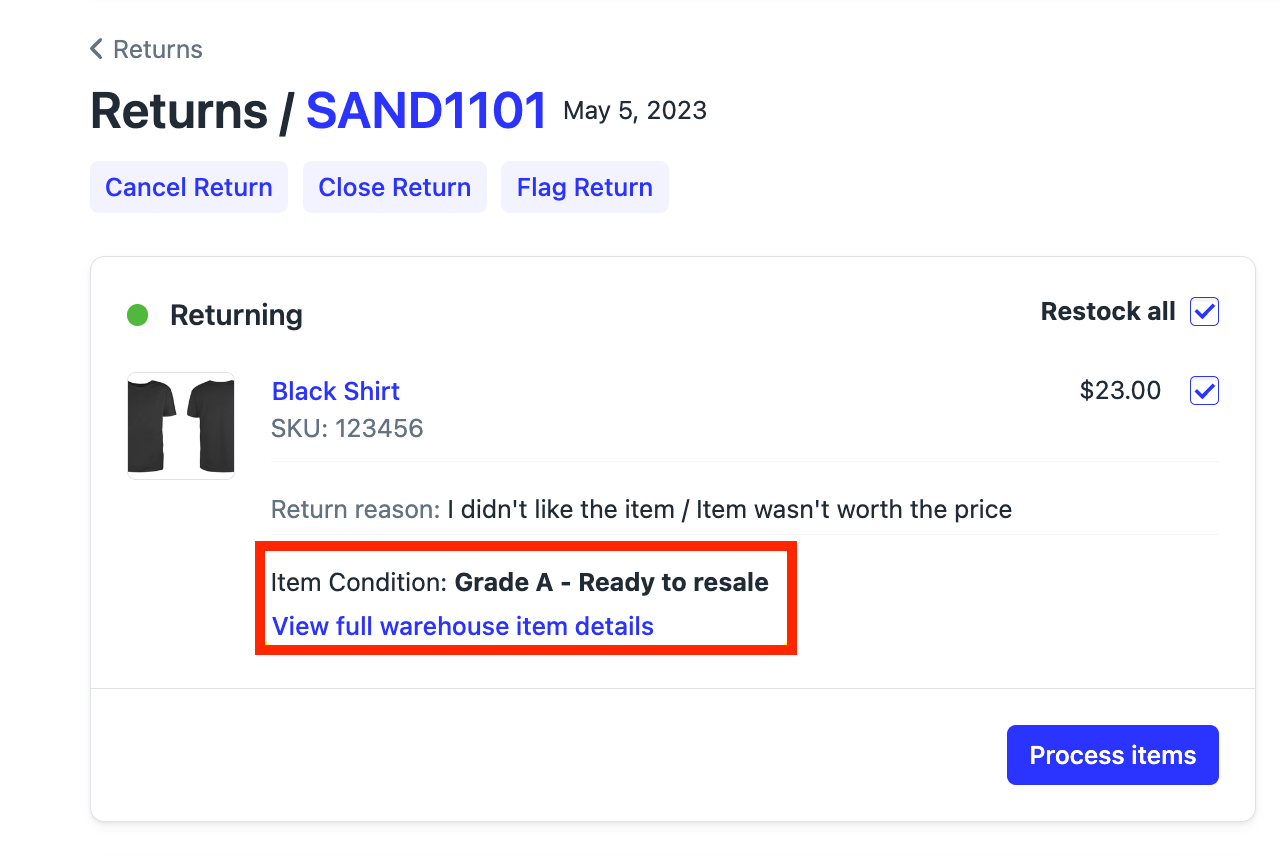
### How to View Your Data
You can view grading and disposition data for a single return in the Loop Admin UI, or in aggregate via reporting. See the **Viewing the data** section of the [Item Grading and Dispositioning](https://help.loopreturns.com/en/articles/1910849#viewing_the_data) help center article for step-by-step instructions.
 ## ✅ Conclusion
Integrating with Loop’s Grading & Disposition APIs streamlines your returns process and improves inventory management.
> **Tip:** You can also use grading and disposition data as a condition in your return workflows, allowing you to automate actions for future returns based on past grading/disposition outcomes. See the **Workflows addition** section of the [Item Grading and Dispositioning
> ](https://help.loopreturns.com/en/articles/1910849#workflows_addition) help center article for more details.
***
If you have questions or need help, reach out to [support@loopreturns.com](mailto:support@loopreturns.com).
## ✅ Conclusion
Integrating with Loop’s Grading & Disposition APIs streamlines your returns process and improves inventory management.
> **Tip:** You can also use grading and disposition data as a condition in your return workflows, allowing you to automate actions for future returns based on past grading/disposition outcomes. See the **Workflows addition** section of the [Item Grading and Dispositioning
> ](https://help.loopreturns.com/en/articles/1910849#workflows_addition) help center article for more details.
***
If you have questions or need help, reach out to [support@loopreturns.com](mailto:support@loopreturns.com).