

Overview
Checkout+ is Loop’s order protection product for stores that integrate via the Checkout+ API at checkout (rather than native Loop checkout extensions). It lets you offer order protection to your customers at checkout — covering returns, shipping issues, or both — via a single API call. Every integration starts the same way: your storefront sends the customer’s cart toPOST /v1/analyze, receives eligibility and pricing, and presents the offer. What differs is how the accepted offer reaches Loop, and that depends on how Loop already ingests your orders:
The bulk of this guide — authentication, the
/v1/analyze request and response, eligibility, UI guidelines, and error handling — applies to both models. The two paths diverge only in how you apply the charge and report the acceptance, covered in Integration Steps (Order API) and Shopify Integration.
How It Works
Shopify integrators: follow steps 1–2 below, then skip to Shopify Integration.
- Analyze the cart — Your integration sends the customer’s cart to
POST /v1/analyze. The API evaluates eligibility rules, calculates the protection price, and returns asessionId, the resolved coveragemode[], andchargeInstructions. - Present the offer — If
eligibleistrue, display the protection offer to the customer using the price inchargeInstructions.amountand copy that matches the modes inmode[]. - Apply the charge (non-Shopify platforms) — If the customer accepts, apply the fee to the cart using whatever native fee mechanism your platform provides. Loop does not prescribe how the fee is stored on the platform.
- Report the fee and session to Loop (non-Shopify platforms) — Once the order is created, push it to the Loop Order API with both:
- A
fees[]entry for the protection charge, withfees[].accepted_offer_modeset to themodearray returned by/v1/analyze, verbatim. Loop uses this to recognize the charge as a Checkout+ acceptance and activate coverage. - A
metadataentry withkey: "session_id"andvalueset to thesessionIdreturned by/v1/analyze.
- A
Base URL
All Checkout+ endpoints are served from:https://api.loopreturns.com/api/v1) — both are used by a complete Checkout+ integration. The cURL and code samples in this guide always show fully-qualified URLs so you can tell which service each call targets.
Authentication
Checkout+ uses the same authentication as the rest of Loop’s APIs. Send your merchant API key in theX-Authorization header — see Authentication for how to create and manage keys, the full header contract, and the 401 response shape.
/v1/analyze requires the Cart scope. A key without Cart — including the key that authenticates your Order API integration — will be rejected with 401 unauthorized. Generate a dedicated Checkout+ key from Returns Management → Tools & integrations → Developer tools in the Loop Admin and select the Cart scope.
CORS
The Checkout+ API is browser-callable — every response (success or error) carries the following CORS headers:
Browsers may issue an
OPTIONS preflight before the actual request whenever you send X-Authorization or a non-simple Content-Type. Loop responds to the preflight with the headers above and a 204 No Content, no merchant API key required for the OPTIONS itself.
Integration Steps
All integrations follow steps 1 and 2. Shopify integrators: skip steps 3 and 4 — see Shopify Integration.
1
Call the Analyze endpoint
Send the customer’s cart data to
POST /v1/analyze whenever the cart changes or the customer reaches checkout.At minimum, include:platform—woocommerce,bigcommerce,custom, or another string identifying your storefront.region— the geographic region for eligibility evaluation. Either an ISO 3166-1 alpha-2 country (e.g."US"), an ISO 3166-2 region ("US-OH"), or a structured{ country, subdivision? }object.cart— withlines,currencyCode,subtotalAmount,totalDiscountAmount,discountedSubtotalAmount,totalTaxAmount,totalAmount, anditemCount.deliveryGroups— required only when your merchant configuration includesshippingProtection. See Shipping Protection and Delivery Methods.
id, productId, quantity, totalPrice, originalTotalPrice, and title. unitPrice is optional.Optionally include a top-level cartId (a stable identifier from your platform) or sessionId (returned by a previous /analyze call) to re-use the existing offer session instead of creating a new one. See Idempotency.2
Handle the response
The response tells you whether the cart is eligible and, if so, what coverage was offered and how to apply the charge.
If
eligible is false, chargeInstructions is null — do not show the offer.3
Apply the charge
Shopify integrators: skip to Shopify Integration.
chargeInstructions.Convert chargeInstructions.amount from minor currency units (e.g. 498 → 4.98) when your platform expects major units.4
Report the fee and session to Loop
Once the order is created on your platform, push it to the Create Order endpoint, or Upsert Order if you sync orders through an existing pipeline. Either way, the order payload must include both:The
- A
fees[]entry for the protection charge, withaccepted_offer_modeset to themodearray returned by/v1/analyze, verbatim — do not transform, sort, or stringify the array. - A
metadataentry withkey: "session_id"andvalueset to thesessionIdreturned by/v1/analyze(e.g.lop_a1b2c3d4e5f6g7h8i9j0).
accepted_offer_mode array tells Loop which coverage modes the customer paid for:The
session_id metadata entry tells Loop which offer session this acceptance corresponds to.Shopify Integration
This section replaces steps 3 and 4 above for Shopify storefronts that offer Checkout+ via this API instead of Loop’s Shopify checkout extension (for example, headless / Hydrogen builds). Steps 1 and 2 — calling/v1/analyze and handling the response — are identical to the rest of this guide.
Shopify is different because Loop already ingests Shopify orders directly. You do not push the order to the Loop Order API. Instead, you signal the accepted offer on the Shopify cart itself, and Loop reads those signals from the order it ingests.
Two signals
A Checkout+ purchase is identified on a Shopify order by two signals, which the analyze response hands you pre-formatted — copy them onto the cart verbatim rather than constructing the keys or values yourself. Loop owns the exact keys and formatting and may change them without requiring a code change on your side.The response shape
When the cart is eligible on Shopify,/v1/analyze returns chargeInstructions.method = "product_line_item" along with the coverage product to add and the lineItemProperties to set on it. The session-linkage signal is returned at the top level as cartAttributes, so it’s available whether or not the customer accepts.
chargeInstructions is null and you should not present the offer.
1
Add the coverage product on accept
If the customer accepts, add the product from
chargeInstructions.product to the Shopify cart as a line item, and set the properties from chargeInstructions.lineItemProperties on that line.Add the exact product returned in chargeInstructions.product — it is the Loop-provisioned coverage product registered for your shop. A generic “protection” product you create yourself will not be recognized as Checkout+ coverage.2
Set the cart attributes (accept and decline)
Set the entries from the top-level
cartAttributes on the cart in both the accept and decline cases. Because the attribute is cart-scoped, it carries the session linkage onto the order even when the customer declines and no coverage line item exists.3
Let Loop ingest the order
Complete the checkout normally. Shopify carries the line item property and cart attribute onto the order, and Loop ingests that order directly — do not push it to the Loop Order API. Posting a Shopify order to the Order API as well would double-report it.
Checkout+ UI Guidelines
Your checkout UI controls how the protection offer is presented to customers. Loop does not inject any UI — your integration is responsible for rendering the offer, handling customer interaction, and reflecting the charge in the cart total.Reference Implementation
The screenshots below show a compliant Checkout+ surface rendered in a cart drawer. Build to match this layout and emphasis.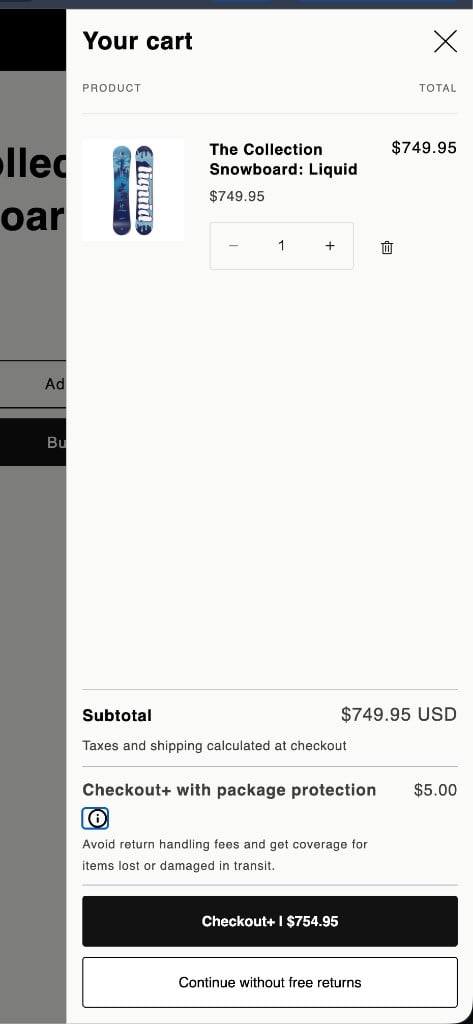
Required Checkout+ offer: value proposition and a primary accept / secondary decline action pair.
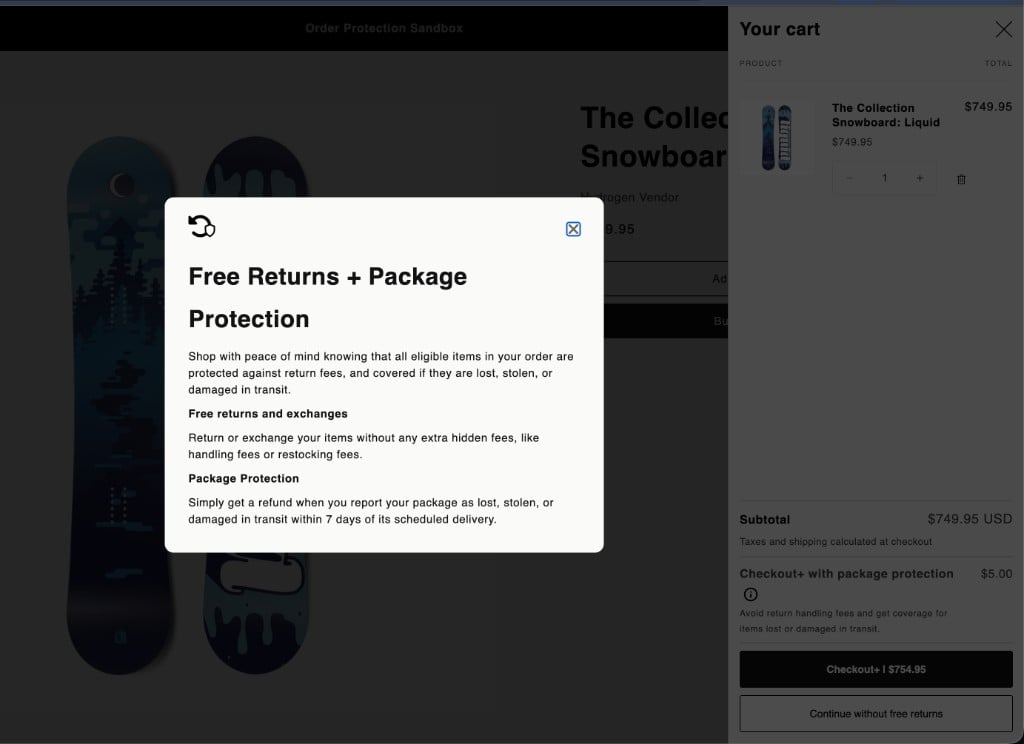
Optional info modal (example): opens from an ⓘ affordance when you choose to include one.
Placement
Display the protection offer after the cart summary and before payment. The offer should feel like a natural part of the checkout flow, not a popup or interstitial.Loading and Error States
Your UI should handle the time between calling the API and receiving a response, as well as failures:Updating on Cart Changes
Re-callPOST /v1/analyze whenever the cart contents change (items added, removed, or quantities updated). Pass the same cartId (or sessionId from the first response) so you re-use the existing offer session.
When the cart changes:
- Call
/v1/analyzewith the updated cart data and the samecartId/sessionId. - Update the coverage-line price, accept-button total, and any other displayed amounts from the new
chargeInstructions. - If the customer already chose accept or decline, preserve that choice across updates unless eligibility or
modechanges make it invalid (see below).
Eligibility Changes
If a previously eligible cart becomes ineligible after a change (e.g. an excluded product is added), the next/analyze response will return eligible: false and chargeInstructions: null. Hide the offer immediately and clear any stored accept selection — you must not apply a fee against a stale chargeInstructions.
Mode Changes
Themode array can change between /analyze calls as the cart changes (for example, removing a non-shippable item may drop shippingProtection from the array, leaving only ["returnCoverage"]). When array membership changes, re-render the value proposition, coverage-line label, and button prices so the customer sees what they’re actually being offered. If the change is material, ask them to choose again rather than silently keeping a prior accept.
Accessibility
Follow standard accessibility practices for the offer UI:- Use native
<button>elements (or ARIA-equivalent controls) for the accept and decline actions, with clear accessible names that include the outcome (e.g. “Checkout with protection, $754.95” / “Continue without coverage”). - Ensure both actions are keyboard-focusable and operable without a pointer.
- Maintain sufficient color contrast for button labels, the value proposition, and price text — including when using theme primary/secondary colors.
Acceptance Determination
There is no explicit acceptance or rejection API call. Loop determines acceptance from the order it receives — either the payload you send to the Loop Order API (Order API platforms) or the order it ingests directly from Shopify. Order API platforms:
This approach is more reliable than a label-matching heuristic because the fee classifies the acceptance (
accepted_offer_mode) and the metadata pairs that acceptance with the exact offer session that priced it (session_id).
Shopify: Loop determines acceptance from the order it ingests directly from Shopify. The coverage product line item — carrying the
_mode line item property from chargeInstructions.lineItemProperties — activates coverage, and the _loop_session_id cart attribute links the order to its offer session. There is no Order API call in this flow.Cancelling Protected Orders
This applies to Order API platforms. On Shopify, cancellations are ingested directly from Shopify along with the rest of the order lifecycle — you don’t sync them through the Order API.
Eligibility Reasons
Every/v1/analyze response carries a reason that explains the eligibility outcome. When eligible is true, reason is always eligible. When eligible is false, reason describes the disqualifying condition — use it to debug configuration issues, understand offer-attachment gaps, and drive any merchant-facing debug tooling you build on top of Checkout+.
Charge Instructions
When the cart is eligible, the response includes achargeInstructions object that tells your integration how to apply the protection charge.
When the cart is ineligible,
chargeInstructions is null.
On Shopify, the session-linkage signal is returned separately, at the top level of the response as cartAttributes — not inside chargeInstructions — so it is available whether the customer accepts or declines.
Shipping Protection and Delivery Methods
When your merchant configuration includesshippingProtection, pass deliveryGroups on every /v1/analyze call so Loop can detect pickup or local-delivery selections that disqualify the cart from shipping coverage. If you omit deliveryGroups, Loop assumes the order is being shipped and will offer shipping protection on in-store pickup orders.
Each entry in deliveryGroups carries a deliveryMethod:
Map your platform’s native delivery types to these generic values before sending — for example WooCommerce’s
local_pickup → PICKUP, BigCommerce store pickup → PICKUP.
Inspecting an Existing Session
GET /v1/session/{sessionId} returns the current state of an offer session without re-analyzing the cart. Use it from any context where you have the sessionId but don’t have (or don’t want to re-send) the cart payload — for example a debug surface, an admin tool, or a downstream worker auditing offer outcomes.
cURL
POST /v1/analyze — sessionId, eligible, reason, mode, chargeInstructions, metadata — with two differences:
Caveats
- Sessions are merchant-scoped. A session created under one merchant API key is invisible to others — you’ll get
404 session_not_foundfrom the wrong key. - Responses are sent with
Cache-Control: private, max-age=45. A short shared cache is fine for poll loops; do not cache across merchants or longer than 45 seconds. - This endpoint is not the right way to drive checkout UI updates — always re-call
POST /v1/analyzewhen the cart contents change so pricing reflects the latest state.
Error Handling
All error responses use a consistent envelope:
Every response includes an
X-Request-Id header for log correlation. Include this value when contacting support about a specific request.
Idempotency
You can re-use an existing offer session in two ways:
Either approach updates the existing analysis rather than creating a new one. The response will reflect the new pricing for the updated cart, and
metadata.sessionCreated will be false with metadata.analysisCount incremented.
sessionId semantics
- The format is fixed:
^lop_[A-Za-z0-9]{20}$(e.g.lop_a1b2c3d4e5f6g7h8i9j0). - A request with a malformed
sessionIdfails with400 invalid_request. Omit the field to let Loop generate a new session. - A well-formed
sessionIdthat does not exist for your merchant fails with404 session_not_found. This usually means the session was never created under this API key, was created against a different environment, or has been evicted. - When both
sessionIdandcartIdare sent,sessionIdtakes precedence — Loop looks up the session directly and ignorescartIdfor session selection.
cartId vs cart.id
These are two different fields with different roles — easy to confuse:
If you want idempotent re-analysis, you must send the value at the top level as
cartId (or pass sessionId).
Debugging
Setdebug: true on the request to receive a debug block on the response with eligibility, pricing, and configuration diagnostics. Use this only during integration testing — the field is gated behind the request flag and is not intended for production use.
Always include the X-Request-Id from the response header when reporting issues to Loop support. It is the fastest way for us to pull the full request/response trace from our logs.
Analytics & Experimentation
/v1/analyze accepts a handful of optional fields that do not influence pricing or eligibility but help Loop segment attach-rate reporting and run A/B tests on your behalf. They’re safe to omit — pass them when you want the analytics value.
Technical Considerations
Related Resources
Analyze Cart — API Reference
Full request and response schema for the
POST /v1/analyze endpoint.Create Order — API Reference
For Order API platforms (non-Shopify): where to push the order with
fees[].accepted_offer_mode and the session_id metadata entry so Loop can activate Checkout+ coverage and link the order to its offer session.Loop Anywhere
Push commerce data into Loop from any source — orders, products, customers, and more.